
Cloudstack CPU Masking and Heterogeneous Clustering


This article explains about CPU Masking in Cloudstack. Also I deal with Heterogeneous Clustering in Cloudstack Xen (XCP) hypervisor platforms. 

Before We Begin:

In Cloudstack we have Cluster in which all the Hosts which are added should be of same
Configuration, but if we need to add different Hosts to Same Cluster (Heterogeneous cluster) then we need to mask the CPU of different host to a common one.

Why should I Mask CPUs?

In order to achieve Heterogeneous clustering, we should be having all the hosts with same CPU Mask. The following steps will guide you to configure CPU Masking and do Heterogeneous clustering to Cloudstack. Homogeneous is so simple which does not even involve CPU Masking. :d

In Cloudstack we can mask the CPU of different hosts to a common mask, to do that we need to know the CPU features of each host which will be added to the cluster.
Login into host and execute xe host-cpu-info to check the CPU features of the particular post before masking. ( The Below image shows Host A's output)
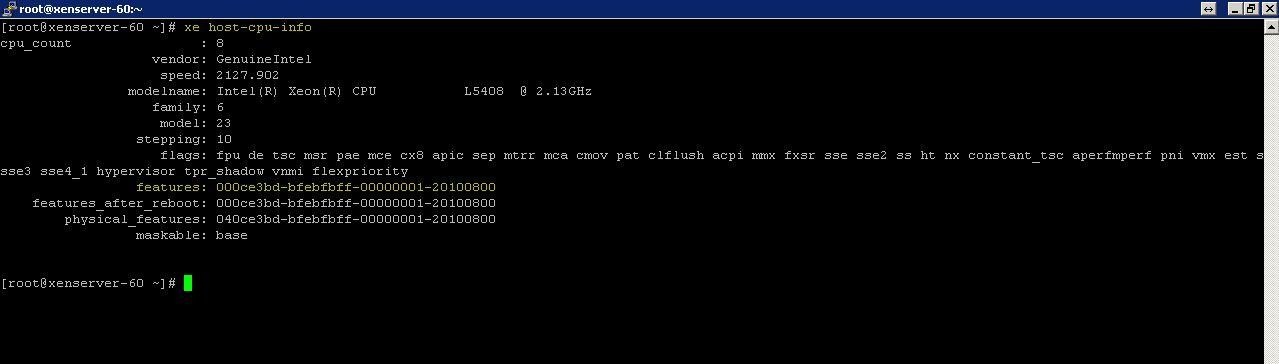


Copy the CPU features of Hosts which are to be clustered. ( The Below image shows Host B's output)


    Here, I used CMB Tool to generate common CPU Mask of A and B.
      Paste the CPU features of the Hosts and generate a Common CPU Mask.
      Login to the Hosts and change the CPU Mask. To change CPU Mask you could execute xe host-set-cpu-features features=<CPU MASK>

      Change the CPU Mask in all the hosts and restart the Hosts to make the change effective.

      Now we can add those hosts of different configuration to the same Cluster as their CPU Masked. :)


      Comments

      Popular posts from this blog

      How to Install CloudSim in Ubuntu (in 3 easy steps)

      The contents of this DIY has been tested on Ubuntu 12.04 LTS x64 with CloudSim 3.0.3 beta and JDK8u11 x64. It should work similarly on other distros of Ubuntu and for different version of JDK as long as you use Java version 1.5 or newer. The text shown in RED in the DIY represents the values that will differ depending upon your JDK version and locations. CloudSim is a framework for modelling and simulating cloud computing infrastructure and services. In this DIY we will see how to install CloudSim in Windows easily and efficiently. A more detailed description, APIs and research papers related to CloudSim can be found here . Let us begin. Step 1: Setting up the Prerequisites 1. First of all we need to download the CloudSim and latest version of the Java Development Toolkit (JDK). CloudSim can be found here . 2. CloudSim requires a working Java installation. So, open up a terminal and run the following 1 sudo add-apt-repository ppa:webupd8team/java 2 sudo apt-get...

      6 Url Shorteners Yang Menghasilkan Uang Selain AdF.ly

      Salam sobat GBX nah di pertemuan kita kali ini ane akan membahas 6 Url Shorteners Yang Menghasilkan Uang Selain AdF.ly seperti yang anda tau adf.ly adalah url shortener terbaik yang membayar kita karena telah menggunakan jasannya, tapi selain adf.ly ternyata masih banyak lagi Url Shorteners Yang Menghasilkan Uang, sekarang kita lihat saja ulasan di bawah.  6 Url Shorteners Yang Menghasilkan Uang Selain AdF.ly 1. Adfly adf.ly Yup yang ini memang patut diletakkan di peringkat satu ya, Adfly sudah ada dan terpercaya sejak bertahu-tahun lalu dan sudah menjadi pemendek link / url terbaik selama ini.  Selain menyediakan fasilitas penyingkat url, adfly juga merupakan situs penghasil dollar yang sudah sangat terkenal (melalui Pay Per Click dan Referal). Banyak juga teman-teman di internet yang sudah sukses mendapatkan dollar lho. (adfly ini sudah terpercaya dan ya semoga terus aman begitu dech). Komisi yang telah anda dapatkan dari adfly ini bisa langsung di transfer ke pay...

      How to install CUCM 8.0.2 on Vmware | Call Manager Installation Guide

      CUCM is a software-based call-processing component which serves as the main engine for Cisco VOIP infrastructure. This article can be used as a reference for your CUCM installation, This article can be used for any version of CUCM like 8.0, 8.6, 9.1 or 10.5. Let's jump to the installation directly. Make sure you have.. Before we begin, I want to make sure that you have the below softwares installed in your machine. Vmware Workstation Bootable Cisco Unified Call Manager ISO File GNS3 (Optional) - To Configure NTP Server A minimum of 2GB RAM and 80 GB HDD for Virtual Machine At this stage I assume that you have both Vmware Workstation and GNS3 installed. During installation you will be prompted to enter NTP server details. Follow the below steps to make a router to act as a NTP server in GNS3. Open ncpa.cpl from Run window. Find a Vmware network adapter. Double click the adapter and configure a private range IP, for example 120.0.0.1. Next open GNS3, Put a router and take console. Pa...